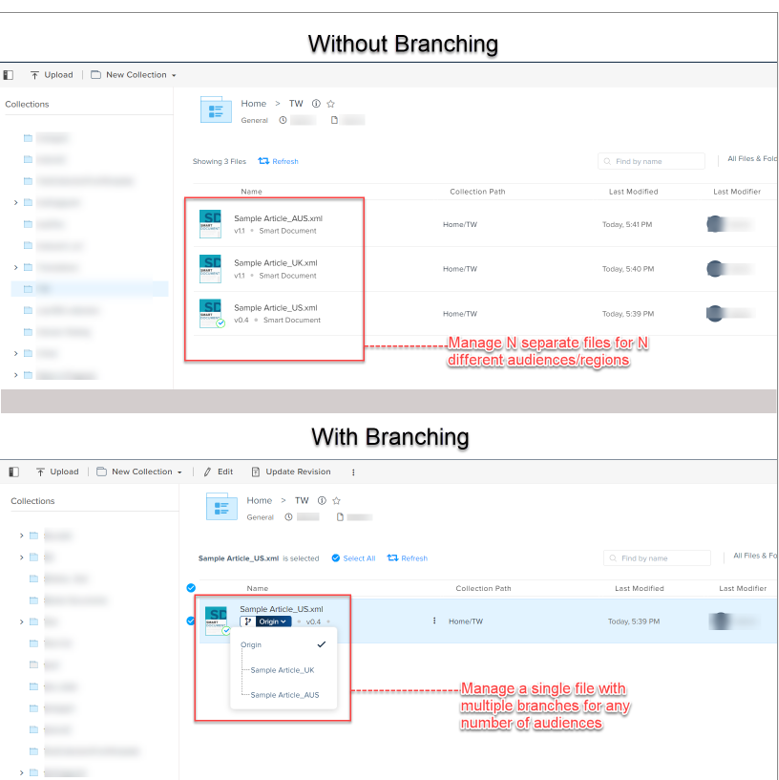
Branching allows you to create several versions of an asset for different audience segments or geographical regions without creating separate copies of an asset. Branching allows better asset and version management because you only have to manage a single copy asset for various audience segments.
For example, if you want to publish three different versions of the same article – one for the US, one for Australia, and one for the UK – you can manage the two versions easily by creating branches of the same document instead of creating multiple copies.
When you create a branch of a document and make any changes to that branch, QPP NextGen does not impact the original document (the origin branch) or any other branch of the document.
How are the branch numbers assigned?
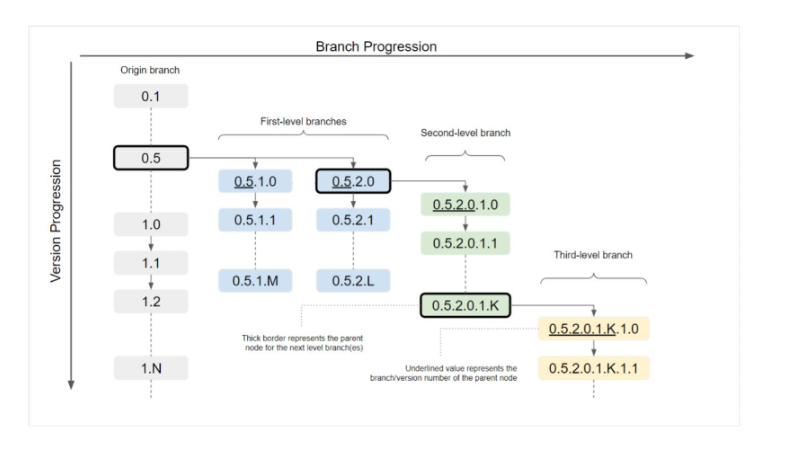
When you create a branch of an asset, QPP NextGen creates the branch from the version of the asset you are currently on, which also becomes the parent node of the sub-branch that you have just created.
QPP NextGen also automatically assigns a branch number to a branch you create. When you do not assign a custom branch label, QPP NextGen sets the automatically assigned branch number as the branch name.
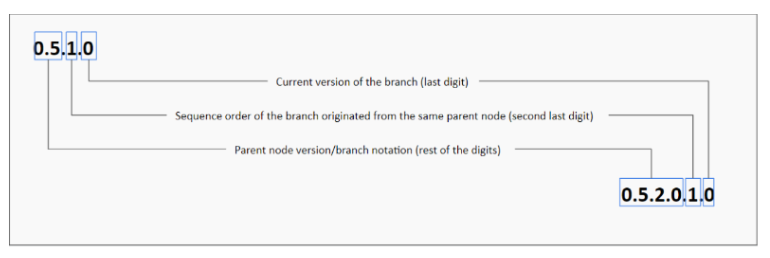
The branch number contains the version/branch number of the parent node, the sequence order of the branch originated from that node, and the version number of the branch. For example, when you create a branch from version 0.5 of the default or the origin branch of the document, QPP NextGen assigns branch number 0.5.1.0 to the new branch, where:
- The last value represents the version number of the branch
- The second last value represents the sequence order of the branch originated from the same parent node
- The remaining value represents the version/branch number of the parent node
If you create a second branch from version 0.5, the branch number of the second branch would be 0.5.2.0. And if you create a sub-branch from the second branch the branch number would be 0.5.2.0.1.0.
Can I merge two or more branches?
Currently, the ability to merge two or more branches into one branch is not possible; however, Quark is going to introduce the feature to merge branches soon. To stay updated on the feature progress, keep checking for the updates on our website https://www.quark.com/ .
Priyanka Bhotika
Comments