QPP NextGen web application allows you to manage (switch) a branch of a document from several locations across the user interface.
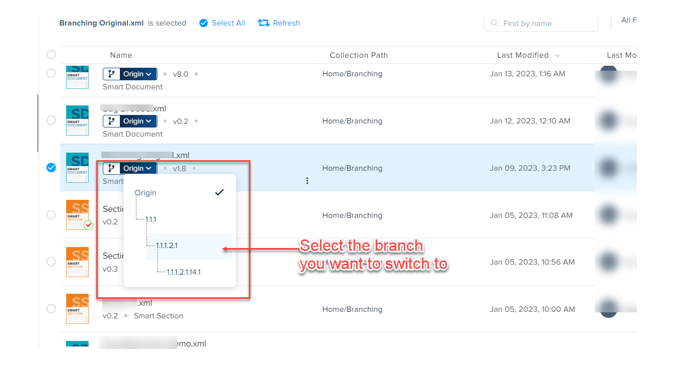
To manage or switch the branch of an asset:
1. Select the dropdown menu icon on the branch information pill element to expand the list of branches available for the asset.
2. Select the branch you want to switch to.
Additionally, you can also switch/change the branch of a component of your document from within the navigation menu of the authoring canvas.
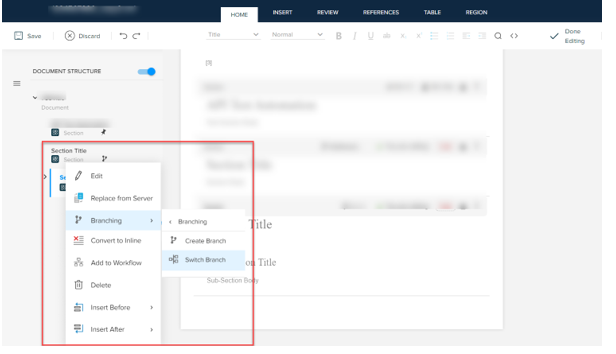
To switch or change the branch of a component in your document:
1. In the navigation menu of the authoring canvas, select the kebab menu icon against the section (for which branches are available) to expand the context menu.
2. In the context menu, select the option Branching > Switch Branch to open the Switch Branch dialog.
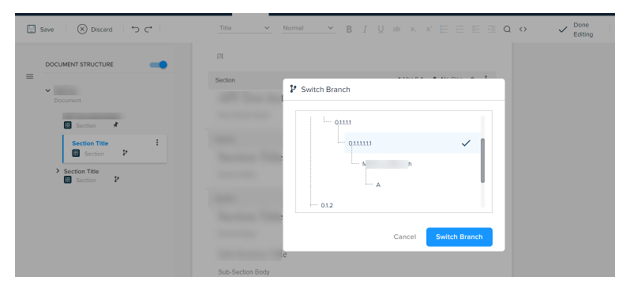
3. In the Switch Branch dialog, select the branch you want to switch to and then select the button Switch Branch.
Priyanka Bhotika
Comments