Content privileges define the degree and type of access that a user can have for different content types. Content privileges are categorized as follows in Administrator:
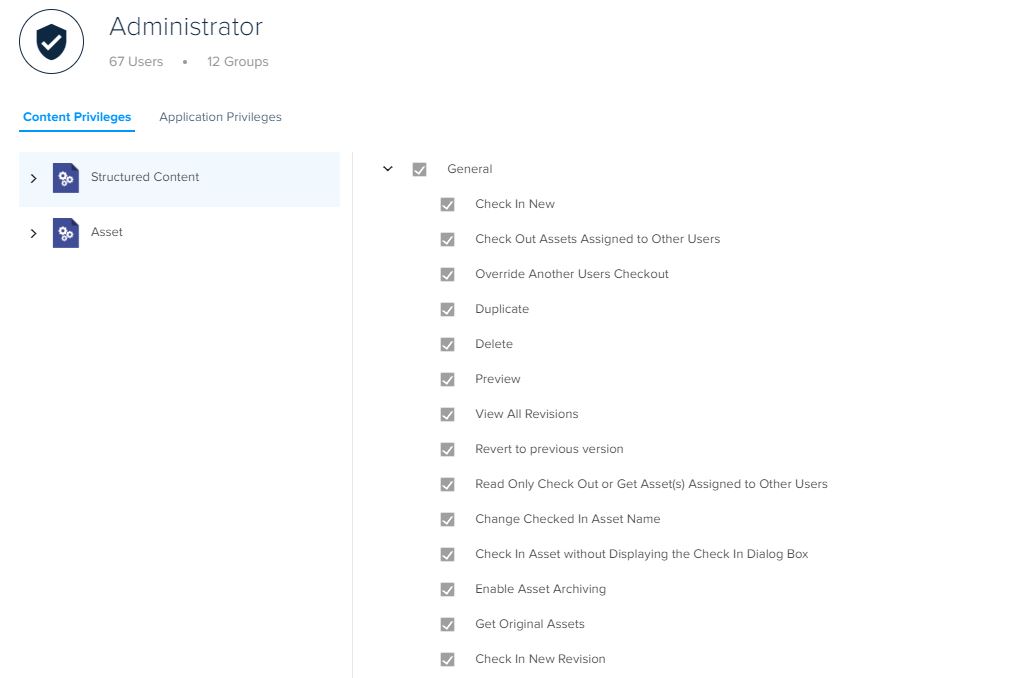
- Check In New: Allows a user to create or check in new assets to the server.
- Check Out Assets Assigned to Other Users: Allows a user to check out assets that have already been assigned to other users.
- Override Another user Checkout: Allows a user to cancel check out by another user.
- Duplicate: Allows a user to duplicate assets.
- Delete: Allows a user to delete assets.
- Preview: Allows a user to preview assets.
- View All Revisions: Allows a user to view all the revisions of an asset within the collection the user has access to.
- Revert to the Previous Version: Allows a user to revert to a previous version of an asset.
- Read-only Check Out or Get Asset(s) Assigned to Other Users: Allows a user to get a read-only copy of an asset, without checking out the asset.
- Change Checked-in Asset Name: Allows a user to change the names of checked-in assets that are assigned to other users.
- Check-In Asset without Displaying the Check-In Dialog Box: Allows a user to bypass the Check-In dialog by pressing Option/Alt on the keyboard while clicking the option Check-In Asset.
- Enable Asset Archiving: Allows a user to archive assets on the server.
- Get Original Assets: This allows a user to get the original version of assets from the server.
- Check In New Revision: When left unchecked, restricts a user with insufficient privileges from creating a new version of an asset even when an author has routed the asset to the reviewer.
Priyanka Bhotika
Comments