Product: Quark Publishing Platform (QPP) NextGen, QuarkXPress
You can check and manage the elements in your content schema and document that have not been used in the publishing template through the Smart Content Preview palette.
To check and manage the unused elements:
- Switch to the Preview view of the project in the Smart Content Preview palette.
- In the Source Content tab of the Smart Content Preview palette, select the Show Unused Elements checkbox.
Note: QuarkXPress displays the icon  at the bottom-right corner of the box where there is an unused element in the project.
at the bottom-right corner of the box where there is an unused element in the project.
3. Select a box with unused elements to highlight it in the Smart Content Preview palette.
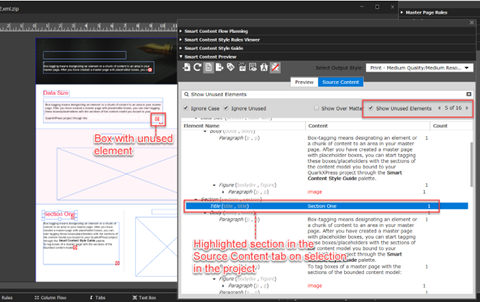
Note: The Source Content tab also displays the total number of unused elements in a document and arrow buttons to move back/forward to the previous/next unused element.
Note: The Source Content tab also displays the total number of unused elements in a document and arrow buttons to move back/forward to the previous/next unused element.
4. Make the changes to the content or master page to include/exclude elements based on your requirements.
Priyanka Bhotika
Comments