To create a master page rule:
- From the header ribbon bar, select Windows > Master Page Rules to open the Master Page Rules palette.
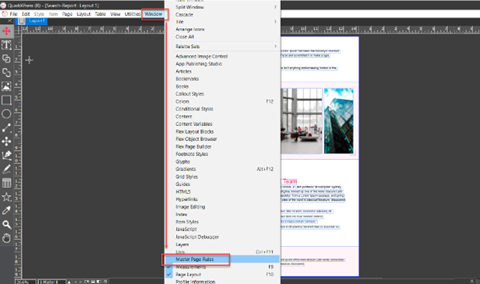
- In the Master Page Rules palette, select the icon to open the dialog New Master Page Rule.
-
In the New Master Page Rule dialog, provide the following input:
- Name of the master page rules in the text field Rule.
- Select the master page from the dropdown list in the first column.
- Select which page you want to apply the master page layout from the dropdown list in the second column.
- Select whether you want to apply the master page layout to odd only or even only or both sides of pages.
- Select whether you want to apply the master page layout to blank only or non-blank only or both types of pages.
- Select the icon
to add a new master page to the master page rule. Select the icon
to remove a master page entry from the master page rule.
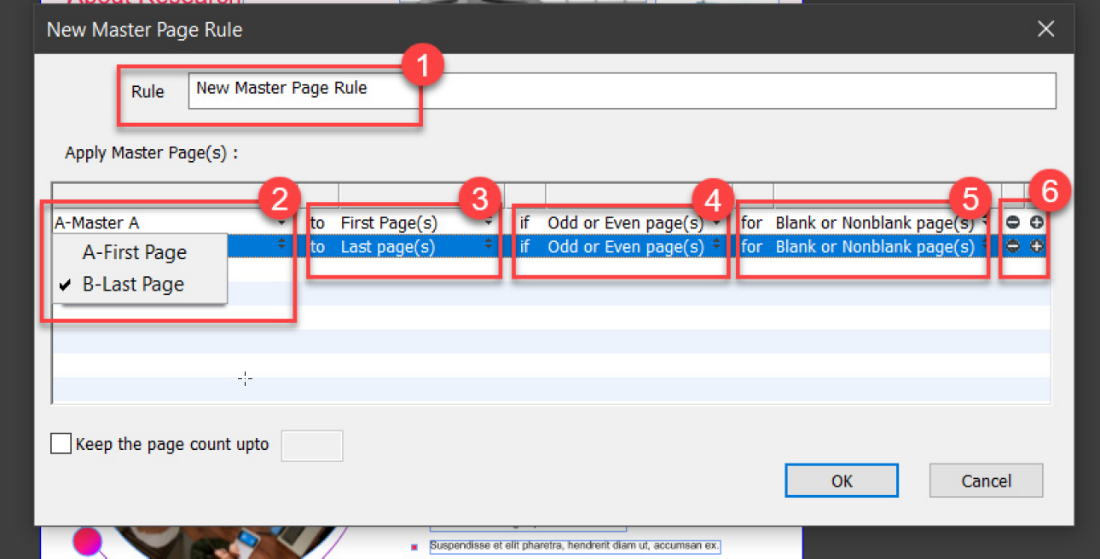
- Select the button OK to save the master page rule.
Priyanka Bhotika
Comments